

For a long time, Google Sheets stored my information but forced me elsewhere to make sense of it. I could track tasks, assign owners, and paste links, but the moment I needed context, I found myself bouncing between tabs, opening Docs, digging through Drive, or checking calendars. And those seemingly quick switches tend to chip away at your focus, turning what should be quick updates into drawn-out tasks.
That changed when I learned how to use smart chips in Google Sheets properly. People, files, dates, and events no longer live somewhere else; they live inside my sheet. Once everything you need is on the same page, you’ll spend less time hunting for information and move through your work faster, with far less friction.
What smart chips do in Google Sheets
Turn plain text into structured, clickable data without extra columns

At their core, smart chips, which you can also use in Google Docs, bring rich, interactive information directly into your spreadsheet cells. Instead of treating names, dates, or links as static text, smart chips turn them into live objects you can interact with instantly.
Google Sheets supports chips for people, Drive files, dates, places, and dropdowns. Beyond those basics, there are specialized chips for YouTube videos, Google Finance entities like stocks and currencies, and even five-star ratings. Each chip generates a contextual preview, such as a file summary, a person’s contact details, or a map with directions, that lets you take action without ever leaving the sheet. When you hover over a person’s chip, you see their contact details and quick actions, such as starting a chat or a call. When you hover over a file chip, you get a preview, ownership information, and the last modified date.
This is what separates smart chips from traditional hyperlinks or basic data validation. A regular link pulls you out of your workflow and into another tab. With a smart chip, you can preview, understand, and act on information while staying where you are.

4 Reasons Why You Should Hover Over Links Before Clicking
We’re used to trusting a link will lead to a safe destination. But that’s not always the case. Hovering your cursor over anchor text can help.
Another key difference is how smart chips behave inside cells. Google treats them as “chipRuns,” which means they coexist naturally with plain text. A single cell can read something like “@Adaeze Uche is reviewing @University of Buffalo Docs,” with both elements remaining fully interactive. Instead of darting from window to window or tab to tab, you have all the basic information you need about the assignee and the document together in one place.
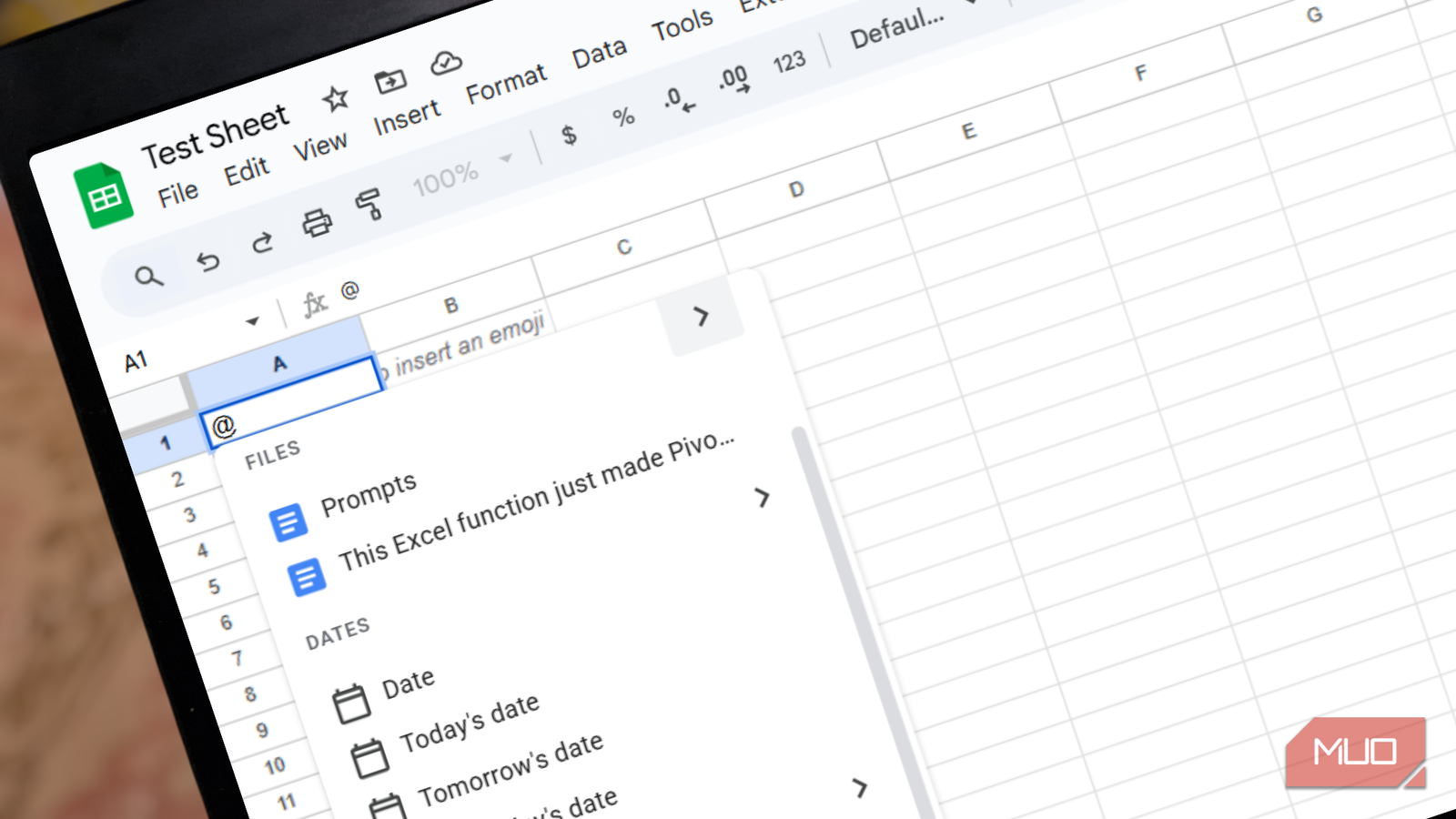
It’s quite simple to add a smart chip to your sheet. I typically start by typing the “@” symbol in a cell, which brings up a menu of suggested people, files, dates, calendar events, components, and media as I type. For chips that do not appear on that menu, such as Finance chips, you can use the top menu bar and select Insert –> Smart chips. The same options are also available by right-clicking any cell and selecting Smart chips.
How smart chips fit into my daily Google Sheets workflow
Fewer lookups, fewer mistakes, and easier collaboration
The biggest improvement smart chips brought to my workflow was how I assign tasks to team members. Instead of dedicating a column to plain-text names or email addresses, I now use people chips. I can even define an entire column as a people-chip column, which keeps my entries consistent and clickable.
When you already have a list of email addresses, Sheets lets you highlight them and convert everything at once by selecting Insert -> Smart chips –> Convert to people chip. You can also control how names display, whether that’s full names, last-name-first formatting, or just email addresses. To change this, select the relevant cells, click Format on the top menu, hover over Smart chips, and choose a display style.
File chips have an equally noticeable impact. Instead of pasting long, cluttered URLs, you can paste a Drive link and press Tab to convert it into a clean chip instantly. When a sheet already contains links, you can convert them the same way as people chips by selecting Insert -> Smart chips -> Convert to file chip. This makes spreadsheets much easier to scan and lets you see file details at a glance without opening anything in a new tab.
Dates and locations also become simpler. Typing @date, @today, or even something conversational like @next Tuesday opens a visual date picker or inserts the correct date immediately. With just the name of a place (e.g., @Sheraton Hotel), you can generate a Map chip that launches an interactive preview with directions, photos, reviews, and other details directly on your sheet. These are simple things, but they’ll save you a lot of minutes.

I wanted to love this open-source maps app but I’m going back to Google
Getting stuck in hour long traffic pileups taught me a valuable lesson.
For tracking progress, I replaced many of my dropdowns with Project status chips because they are quick to insert and color-coded in a way that works well out of the box. You’ll also find options like Size, Priority, Review status, and Yes/No. Instead of spending time configuring rules from scratch, you can highlight the relevant cell, type “@,” and select a dropdown. Sheets will show you the data validation settings in Google Sheets immediately, and once you click Done, everything will be ready to use.
Smart chips really start to shine when I share my sheets with others. Hovering over a person’s chip lets collaborators schedule a meeting or start a conversation. Hovering over a file chip shows whether it’s current and who owns it. While the spreadsheet’s file permissions still need to be managed separately, smart chips reduce the friction of figuring out where things live and who’s responsible for them.
There’s also a more advanced layer to smart chips. When a cell contains a people chip, you can use dot-notation formulas like [=A1.email] or [=A1.name] to pull profile data into nearby cells automatically. File chips work the same way, allowing you to extract details like ownership, creation time, file type, or file name using expressions such as this:
=A1.[file name]
Alternatively, you can extract metadata using Sheets’ built-in data extraction tools by right-clicking the cell containing a smart chip, selecting Data extractions, and choosing the fields you need in the sidebar. Once you click Extract, Sheets automatically fills in the information.

When your cells carry context, Sheets stops slowing you down
By pulling people, files, dates, and live data directly into your cells, smart chips turn your spreadsheet into something closer to a dashboard. Each cell becomes an entry point into the rest of your work, rather than a dead end. Instead of jumping between tabs and tools to gather context, you can see what matters, take action, and move forward without breaking focus or leaving the spreadsheet.
Smart chips are free and incredibly easy to use, which makes it hard to find a reason not to start using them right away.
