

I’m a bit of a procrastinator. Once I get going, I’m fully focused and in the zone, but like many, finding that spark is sometimes difficult.
One of the things I continually put off is cleaning my PC. I know that I should do it, and I know the risks of not doing it. Heck, I even work for a tech site where I’ve written articles about the dangers of not cleaning your PC. I know the issues I’m creating.
So, worse, I’m a procrastinator and a hypocrite? This is not going well for me. So, I finally got down into the corner of my office, pulled my PC out, and started giving it a clean.
Wow, was I for a shock.
Out of sight, out of mind, right?
Well, no

Like many PC owners, my desktop is tucked into a corner, under the desk, with a mass of cables sticking out of the back. It’s a convenient spot that doesn’t take up any extra room, and I can access the PC front panel easily (with a USB 3.0 hub to access the rear).
That space-saving convenience doesn’t always equate to the best situation for our expensive PC hardware, though. Plus, the lies we often tell ourselves about how often we’ll clean the PC keep us going with the neglect.
I can’t actually remember when I built this PC. At least, not exactly. It was definitely post-2020, as it has an AMD Ryzen 7 5800x CPU, but that’s actually the only bit of hardware I can use to date it; I’m still rocking an ancient GTX 1070, so there is no age-related clue there.
At the time I bought the new CPU and motherboard, I also bought a new PC case. This much I do remember. However, it’s a Corsair 500D, which was released in 2018, so again, no use in figuring out when I built the PC.
That aside, when I built it all, I was much more up to speed with cleaning. I’d regularly remove the dust filters and clean them out, as well as pull the desktop out and open the glass side-panels and give everything a clean.
But now? There has been a gradual decline.
The state of my PC case
Is the dust directly affecting performance?
You know what’s coming: I finally pulled the PC case and started to give it a good, deep clean. I’d say it’s been at least a year since I disconnected all of the cables, pulled the whole PC out, and took it downstairs to really tidy up every bit of hardware.
I can’t lie; this isn’t particularly pleasant. The corner of the room is where the dust gathers. I also have two cats, and we’re a family of long-haired people, including myself. So, hair is an ever-present throughout the house. Downstairs, the robovac takes care of problems. But in the corner of the office, behind the PC tower, there is no such magical autocleaning robot.
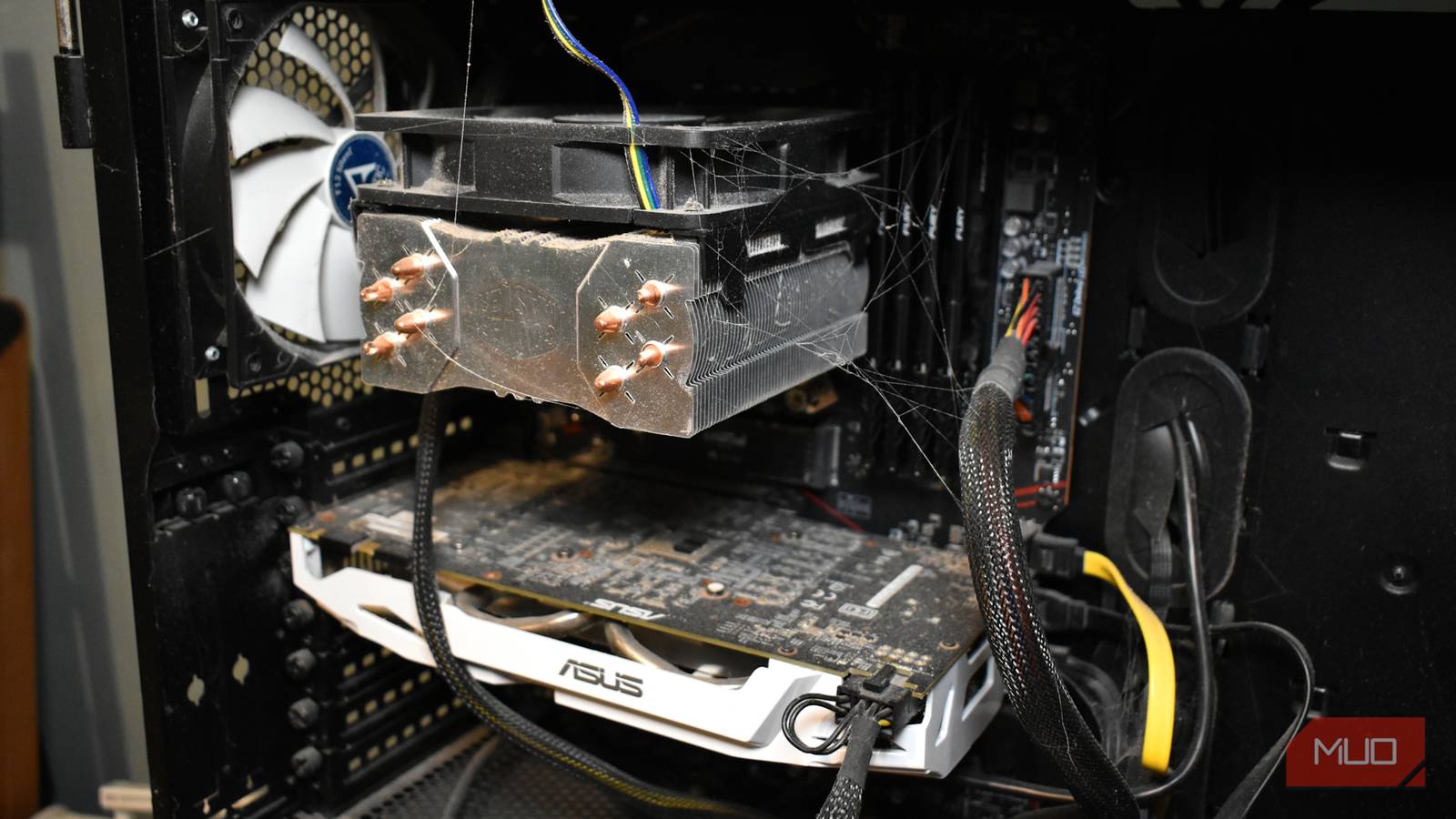
My case has some clear areas of dust build-up, typically where you’d expect. The CPU heat sink looks desperate for air, while the case fans have definitely been crying out for a proper clean for a while. Then the overall case is just dusty and a little on the grimy side. Nothing horrendous, but clearly in need of love.
Let the clean up commence
Do this outdoors if you can, or at the very least near the door

By this point, it’s clear that my desktop needs a deep clean. It’s been at least a year, the dust is clearly about to start causing performance issues, and we all know that PC hardware and dust aren’t best friends.
I’d strongly advise you to get outdoors if possible. You don’t want to redistribute years’ worth of dead skin cells and cat hair back into your local vicinity. But I appreciate that’s not always easy; it’s the middle of winter here in the UK at the time of writing, and that means a steady flow of rain. So, of course, don’t get your PC wet, but make sure your cleaning area is well ventilated.
Now, cleaning a dusty PC like mine isn’t a straight-up air-duster spray-and-pray operation. You do need to be tactical in your approach to removing dust; otherwise, you’ll have to do it all over again. It becomes a waste of time and effort, not to mention your air dusters will run out.
Being methodical here can save a lot of time. I’d suggest:
- Air dust the loose layers on the CPU cooler, GPU fans, case fans, and similar. Get that first layer of dust gone.
- Wipe down your PC hardware gently, shaking out the duster as you go to keep the dust removal process going. Shake it outdoors, out the window, or similar to remove the dust from the room.
- Now, use some isopropyl alcohol on a clean cloth to remove any stubborn dust patches, grime, build-up, and so on. Like before, you need to be firm but gentle in your application of force. You’re cleaning your PC, but remember, these are expensive bits of hardware.
Now, once you’re sure you’ve cleaned everything up, there is one more step to take care of: cleaning where you keep your PC. That means get in there and give your desktop’s corner of the house a good scrub, including the cables, walls, and anything else dusty or likely to be contributing to the problems.
Once you’re done, it’s time to slot your PC back home and start connecting up all the wires, ready to reboot.

8 catastrophic mistakes first-time PC builders make — and how to avoid them
You can be sure nearly every PC builder has made these mistakes, but you can skip them now you know.
Don’t be like me
Regular cleaning really is the best
I tend to treat my PC like a box that will just work, all the time. But it’s a physical machine with moving parts that I should take more care of, especially with a 10-year-old GPU that’s probably in use for 10 hours a day, every day.
On that, don’t be like me. Set an actual reminder to clean your PC regularly, and stick to it. Your PC will be so much happier for it.
