
Close Menu
InclusiFund
    What's Hot

    Best QA Testing Tools for SaaS Applications in 2026

    March 4, 2026

    Discovery that Meta staff watch users’ Ray-Ban recordings raises privacy concerns

    March 4, 2026

    I stopped using Wi-Fi for my TV and I’m never going back

    March 4, 2026
    Facebook X (Twitter) Instagram
    InclusiFund
    Facebook X (Twitter) Instagram
    • Home
    • Daily Brief
    • Dealflow Dashboard
    • Sectors
      • Agritech
      • Climate Tech
      • Fintech
      • Healthtech
      • Logistics
      • Mobility
      • SaaS / Enterprise
    • Tools
    • Reports
    • Opinion
    • Services
      • For Investors
      • For Founders
    • About Us
    • More
      • Disclaimer
      • Advertise With Us
      • Newsletter
      • Work With Us
      • Terms and Conditions
      • Privacy Policy
      • Contact Us
      • About Us
    InclusiFund
    Home»Tools»Windows 11 Insider build 26220.7523 adds Ask Copilot on the taskbar, Agent launchers, and Narrator controls
    Tools

    Windows 11 Insider build 26220.7523 adds Ask Copilot on the taskbar, Agent launchers, and Narrator controls

    ElanBy ElanDecember 20, 2025No Comments6 Mins Read
    Facebook Twitter Pinterest LinkedIn Tumblr Reddit WhatsApp Email
    Windows 11 Insider build 26220.7523 adds Ask Copilot on the taskbar, Agent launchers, and Narrator controls
    Share
    Facebook Twitter LinkedIn Pinterest WhatsApp Email

    Microsoft has released Windows 11 Insider Preview Build 26220.7523 (KB5072043) to the Dev and Beta Channels, based on version 25H2. The update introduces several Copilot-related additions to the taskbar, expands accessibility controls in Narrator, tweaks input and widgets, and delivers a long list of fixes. The same build is available in both channels for now, which also opens a temporary window for Dev Channel users to switch to Beta without reinstalling.

    The release follows Microsoft’s current Insider strategy: features are split between those rolling out gradually to systems with the “get the latest updates as they are available” toggle enabled, and changes that apply to everyone in the Dev and Beta Channels. Most of the headline additions in this build fall into the gradual rollout category.
    Ask Copilot arrives on the taskbar for commercial users

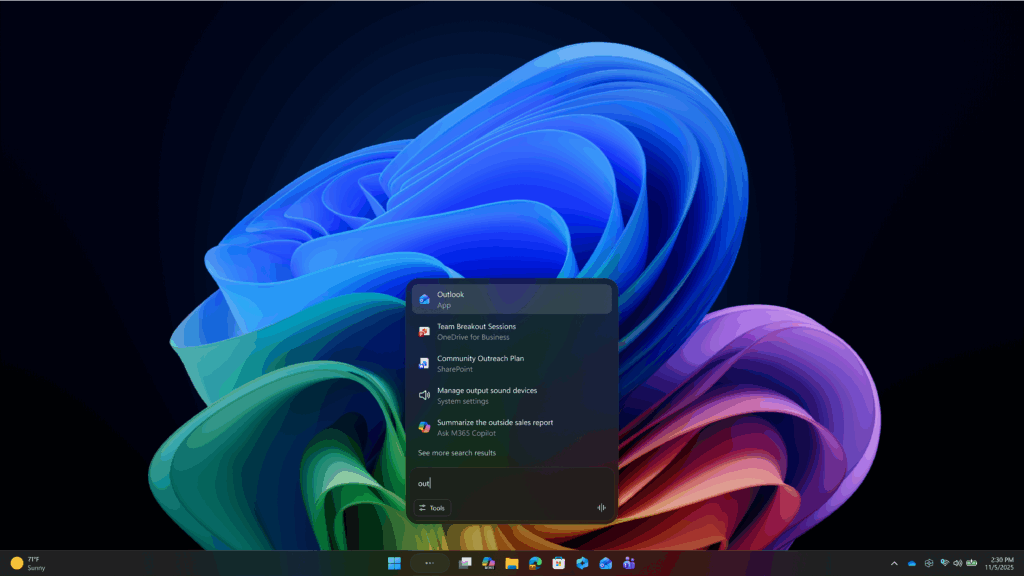
    The most visible change is the rollout of Ask Copilot on the taskbar for commercial customers with Microsoft 365 Copilot licenses. Consumer Insiders saw an earlier version of this feature in October; this build brings a variant tailored for work environments.

    Ask Copilot acts as a unified entry point to Microsoft 365 Copilot, Copilot agents, and search. From the taskbar, users can open Copilot with a single click, interact using voice or text, and reference contextual work information tied to their Microsoft 365 environment. Agents can be invoked directly by typing “@” or using the tools button, and search results for apps, files, and settings use the same Windows APIs as standard Windows Search.

    The feature is opt-in. It can be enabled under Settings > Personalization > Taskbar > Ask Copilot. Microsoft notes that Ask Copilot does not grant Copilot additional access to personal files beyond what Windows Search already exposes.

    The rollout is limited at first to commercial Windows Insider Program customers in the United States and will expand gradually over the coming weeks.

    Agents gain taskbar presence and a new launcher framework

    Build 26220.7523 also expands how Copilot agents surface in Windows. Agent tasks, such as reports generated by the Researcher agent, can now appear directly on the taskbar. Progress indicators and hover states show real-time updates, and notifications are sent when tasks complete. Microsoft is still experimenting with how these tasks appear, either grouped with the Copilot icon or as separate entries.

    Under the hood, Microsoft is introducing Agent Launchers, a new framework that lets Windows apps register AI agents system-wide. Once registered, these agents become discoverable across supported experiences, including Ask Copilot on the taskbar and compatible apps. Agents open their own chat experiences when launched and can maintain context, ask clarifying questions, and take actions.

    Microsoft 365 Copilot already uses this framework to expose agents like Analyst and Researcher. Developers can register agents during installation or dynamically at runtime, depending on authentication or subscription state.

    Narrator gains granular speech customization

    Accessibility sees a notable update in this build. Narrator now allows users to control exactly what properties are spoken when navigating UI elements and in what order. Labels, roles, states, and values can be selected, reordered, or omitted per control type.

    Customization is available with Narrator key + Ctrl + P, where users can adjust announcements for buttons, checkboxes, sliders, and other controls. Changes apply across the current app. A preview option lets users hear how an announcement will sound before saving, and a reset option restores default behavior.

    On Copilot+ PCs, Narrator customization also supports natural language input. Users can type instructions such as disabling position or selection announcements instead of manually toggling options.

    Input, widgets, and language expansion

    Several smaller but practical changes ship with this build:

    • Voice typing with the touch keyboard drops its full-screen overlay. Dictation state animations now appear directly on the dictation key, reducing visual disruption.

    • A new Discover Windows widget delivers short tips about Windows features, shortcuts, and security reminders. It can be added to the Widgets board or the lock screen and updates throughout the day.

    • The Settings Agent expands language support to German, Portuguese, Spanish, Korean, Japanese, Hindi, Italian, and Simplified Chinese, in addition to existing English and French locales.

    • The Arabic keyboard layouts gain AltGr support, including access to the Saudi Riyal currency symbol.

    • Voice Access introduces a streamlined setup flow that simplifies model downloads, microphone selection, and feature discovery.

    File Explorer updates and fixes

    File Explorer receives both visible changes and performance improvements. For consumer Microsoft account users, people icons now appear in the Activity column on File Explorer Home and in areas like Recommended and Recent. Hovering or clicking these icons opens a Windows People Card with context about recent file interactions and quick actions such as starting a chat or call. This brings a feature previously limited to work and school accounts to consumer cloud files.

    On the fix side, Microsoft addressed white flashes during navigation, reduced duplicate file indexing to improve search performance, improved search reliability across multiple drives, and resolved an issue blocking OneDrive files from opening in RemoteApp sessions. Voice Access navigation in the Gallery view has also been simplified.

    Taskbar behavior, known issues, and Paint update

    The build adjusts taskbar behavior when apps are set to uncombined, preventing large window groups from being pushed wholesale into the overflow area. Microsoft has temporarily paused a separate taskbar animation rollout while investigating reported issues.

    Known problems remain. Some Insiders report Start menu clicks not opening Start, system tray icons failing to appear, and autohide taskbars triggering too early and blocking app interaction. File Explorer context menu crashes and Bluetooth battery level display issues are also under investigation.

    Outside the OS itself, a Paint update is rolling out to Canary and Dev Channels. Version 11.2511.281.0 introduces a collapsible toolbar that can automatically hide and be recalled as needed.

    What to do if you’re testing this build

    Insiders who want the newest features first need to enable the “get the latest updates as they are available” toggle in Windows Update. Dev Channel users should also decide soon whether to switch to the Beta Channel while both channels share the same 25H2 builds. Once the Dev Channel advances to a higher build number, that option will close.

    Features in this build are still subject to controlled rollouts and may change, be removed, or never ship beyond the Insider program.

    Summary

    Windows 11 Insider build 26220.7523 adds Ask Copilot on the taskbar, Agent launchers, and Narrator controls
    Article Name

    Windows 11 Insider build 26220.7523 adds Ask Copilot on the taskbar, Agent launchers, and Narrator controls

    Description

    Windows 11 Insider build 26220.7523 adds new Copilot features to the taskbar, along with accessibility and File Explorer improvements. The update also delivers multiple fixes and gradual feature rollouts for Dev and Beta Channel testers.

    Author

    Arthur K

    Publisher

    Ghacks Technology News

    Logo

    Ghacks Technology News

    Adds Agent build controls Copilot Insider launchers Narrator taskbar Windows
    Elan
    • Website

    Related Posts

    I stopped using Wi-Fi for my TV and I’m never going back

    March 4, 2026

    I tried using “open-source Windows,” but it still doesn’t measure up to the real thing

    March 3, 2026

    Getting Started With The Popover API — Smashing Magazine

    March 2, 2026
    Leave A Reply Cancel Reply

    Economy News
    Crypto

    Best QA Testing Tools for SaaS Applications in 2026

    By ElanMarch 4, 20260

    SaaS teams face a constant challenge: how do you test fast enough to match weekly…

    Discovery that Meta staff watch users’ Ray-Ban recordings raises privacy concerns

    March 4, 2026

    I stopped using Wi-Fi for my TV and I’m never going back

    March 4, 2026
    Top Trending
    Crypto

    Best QA Testing Tools for SaaS Applications in 2026

    By ElanMarch 4, 20260

    SaaS teams face a constant challenge: how do you test fast enough…

    Tech

    Discovery that Meta staff watch users’ Ray-Ban recordings raises privacy concerns

    By ElanMarch 4, 20260

    The death of Google Glass in 2013 was a victory for social…

    Tools

    I stopped using Wi-Fi for my TV and I’m never going back

    By ElanMarch 4, 20260

    Wi-Fi networks in many homes are strained by bandwidth, interference, and range…

    Your source for comprehensive insights on Africa’s private credit markets, InclusiFund synthesizes deal pipelines, repayment patterns, collateral trends, and sector-level signals to guide investors in underwriting and structuring credit in emerging African markets.

    We're social. Connect with us:

    our Categories
    • Work With Us
    • Advertise With Us
    • Contact Us
    • Disclaimer
    • Privacy Policy
    • Terms and Conditions

    Subscribe to Updates

    Get the latest creative news from FooBar about art, design and business.

    Facebook X (Twitter) Instagram Pinterest
    • Work With Us
    • Advertise With Us
    • Contact Us
    • Disclaimer
    • Privacy Policy
    • Terms and Conditions
    © 2025 Inclusifund. All Rights Reserved.

    Type above and press Enter to search. Press Esc to cancel.
