

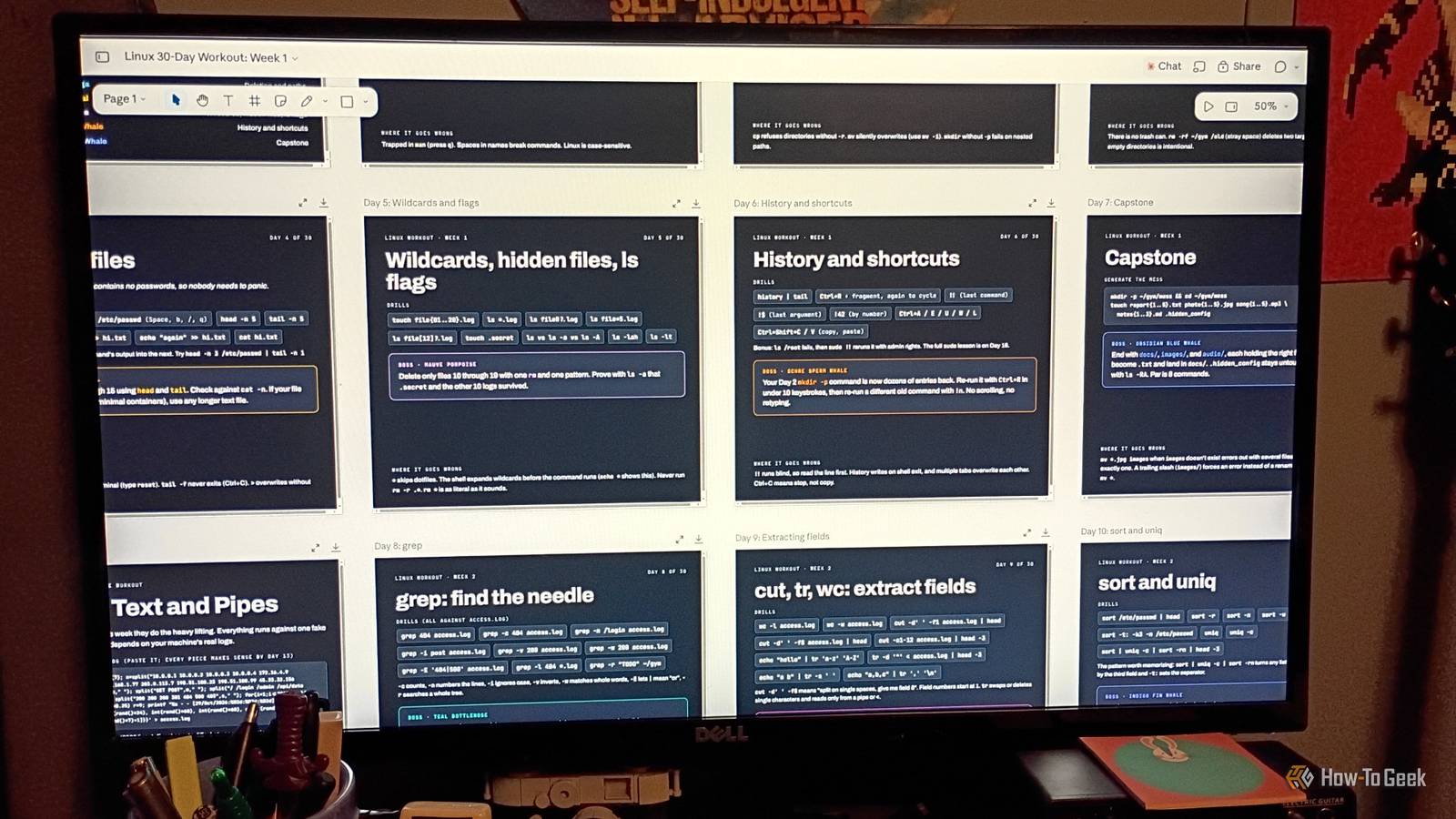
I’m good with the Linux command line. I use it daily and even teach basic Linux operations to a few students. But I was thinking about it the other day and realized: I can get around and do a lot using the Terminal, but am I truly fluent with the command line? I don’t think I am. Every so often, I like to test Claude, whether it’s for gaming tweaks, research, or other stuff. I wanted to see how it would do on something useful, so I devised an experiment that asked a simple question: can an LLM design a 30-day Linux workout that can make a daily/familiar Linux user with a lot of experience more fluent with the command line? The answer was surprising.
Designing a fluency course from the ground up
Setting parameters and guidance for a Linux “workout”

As I’ve stated many times in the past, I’m not very into LLMs, nor do I use them often. However, every few months, I like to check in to see if they’ve improved. I used the Opus 5.5 model. It seemed like a good idea at the time, but I sometimes get very frustrated with LLMs. After some obnoxious back and forth with Claude, I finally got it to produce a decent plan.
A good portion of it was from my outlines and notes that I shared in “conversation” with Claude. In my opinion, it went a little too basic for the first week, but if I’m looking at it from the perspective of a new user, I can understand why.
I didn’t want to take a “back to basics” approach or start from scratch, but Claude thought I did.
We worked around it and came up with a full 30-day roster, followed by “boss battles” to check understanding. With that basic framework in mind, we started building the workout.
Getting into some Linux challenges with Claude
Designing a workout plan didn’t take long
If there’s one thing I worry about in the world of LLMs it’s cognitive offloading. I like to learn things and be able to do them later on. I like a little bit of challenge or friction in what I do. Occasionally, it’s a good idea to do a knowledge check and physically practice the commands.
I didn’t stop practicing guitar when I got a virtual amp. I didn’t stop practicing drawing when I got a tablet. And I certainly never stopped honing my painting skills after getting some speed paints and an airbrush.
The same thing applies here. I’d much rather work in conjunction with the LLM than have it think/do/feel for me. So I mentioned having a mini-test at the end of each week, which Claude translated into “boss battles.”
I agreed with the suggestion for the “end of the week” drills. A series of “boss battles” would definitely be appropriate. I instructed Claude to give them cetacean-related names because I am fascinated by ocean creatures. I gave it Chartreuse Humpback and Mauve Porpoise, and it kind of just went from there. I even showed it some of my comic work for reference:

It came back with a reasonable structure for a weekly challenge to test the skills students might build with this type of workout. It even threw in a Zappa reference. That was pretty neat, as I’m a huge FZ fan.
It even named the week based on the skills to be learned. Nice touch. I think after talking to me for a while, and all of the instructions I gave it, it finally understood the scope of the task.
After that, it didn’t take long to devise the plan.
Some notes about getting into a practice routine
And maybe learning a new thing or two

Practice makes perfect. But don’t let anyone ever tell you that it isn’t tedious or a pain in the neck, especially when you’re already familiar with the basics. One of the things I liked about the plan Claude helped develop is that it could help newbies learn the command line.
There are a few places in the workout where high failure or issues could occur. For example, improperly using rm -rf, using sudo on everything, appending -y to updates without knowing what you’re downloading, or misusing the dd or chmod -R commands. Those could all get pretty dicey if you’re not careful.
I think the best way to practice it is on a virtual machine, separate from your primary OS. Install Debian or Ubuntu in a virtual machine and use it to do the Linux command line workout. That way, you don’t risk damaging files on your system if you screw up.
If you’re new to Linux, I don’t recommend using sudo outside your VM environment or running a root command, unless you fully understand what it does. I went through the entire 30-day workout as described, but finished it much faster than that. Since I already have a lot of knowledge and existing skill, it was very easy for me to get through the first few weeks of the workout in a couple of days.
I actually found I gained the most from “Week 4: Automation.” I already automate a lot of things, but I gained a better grasp of Rsync and creating backup scripts than I had before. A new user or student, however, would probably take the full 30 days or longer.
That’s kind of the snag in this whole thing. It doesn’t walk you through anything. A student will still need a guide, book, or teacher with them to help. I suppose they could also ask Claude to explain things, but that just seems like it defeats the purpose of seeking out knowledge yourself. I mean, there’s a Linux Pocket Guide out there for super cheap that you can buy and keep right next to your desk. Then, bookmark (with physical bookmarks) and highlight (with physical highlighters), and read (with physical, well, you get the point) it yourself to learn.
Augment real, genuine learning with the LLM’s assistance, and I feel like that could be helpful. Relying on Claude alone to spell everything out for you and do it for you defeats the entire purpose of trying to learn, in my opinion.
I still think LLMs are best used as a tool for augmentation
LLMs are weird. It’s very fascinating how they work under the hood. The more I test them, the more I see where they can work as an augment to things. But I still have my doubts about them being anything other than a learning tool. I think the garbage in/garbage out rule applies to them in a major way. I gave it information based on my existing knowledge and experience, and it created a fluency course based on my instructions. It worked well enough. So, am I more fluent at using the Terminal? I’m 100% more confident, and I do seem to be getting around faster. So I would say, yeah, I think it worked.
