

Close Menu
InclusiFund
    What's Hot

    Why Trump backed a crypto ethics rule that stopped at the family business

    September 19, 2026

    10 Nigerian creators turning social media influence into industry power

    September 19, 2026

    5 times Android Auto says No when your phone says Yes

    September 19, 2026
    Facebook X (Twitter) Instagram
    InclusiFund
    Facebook X (Twitter) Instagram
    • Home
    • Daily Brief
    • Dealflow Dashboard
    • Sectors
      • Agritech
      • Climate Tech
      • Fintech
      • Healthtech
      • Logistics
      • Mobility
      • SaaS / Enterprise
    • Tools
    • Reports
    • Opinion
    • Services
      • For Investors
      • For Founders
    • About Us
    • More
      • Disclaimer
      • Advertise With Us
      • Newsletter
      • Work With Us
      • Terms and Conditions
      • Privacy Policy
      • Contact Us
      • About Us
    InclusiFund
    Home»Tools»Google is finally fixing one of Calendar’s most annoying meeting features
    Tools

    Google is finally fixing one of Calendar’s most annoying meeting features

    ElanBy ElanAugust 28, 2026No Comments2 Mins Read
    Facebook Twitter Pinterest LinkedIn Tumblr Reddit WhatsApp Email
    Google is finally fixing one of Calendar’s most annoying meeting features
    Share
    Facebook Twitter LinkedIn Pinterest WhatsApp Email

    The Google Calendar app icon displayed on a Pixel 9 Pro.

    Taylor Kerns / Android Authority

    TL;DR

    • Google Calendar is getting an update that allows meeting organizers or their delegates to choose whether or not to receive RSVP emails and automatic responses.
    • The new setting is beneficial for organizers who don’t need to be informed about every individual attendee’s response.
    • The gradual rollout starts today for all Google Workspace customers, Workspace Individual subscribers, and users with personal Google accounts.

    Have you ever set up a meeting in Google Calendar and gotten overwhelmed by all the RSVP emails and automatic responses? While it can be useful to know who is and isn’t attending your event, having your inbox get flooded by these messages is far from ideal. It’s just one of the app’s annoying quirks. But Google is finally solving this problem in Calendar’s latest update.

    In a blog post, the tech giant announced it is rolling out a new Calendar setting. The new setting will allow meeting organizers or their delegates to choose whether or not to receive RSVP emails and automatic responses (like out-of-office emails). This option is called “Get an email when guests respond,” and it will appear just above the option to write a description.
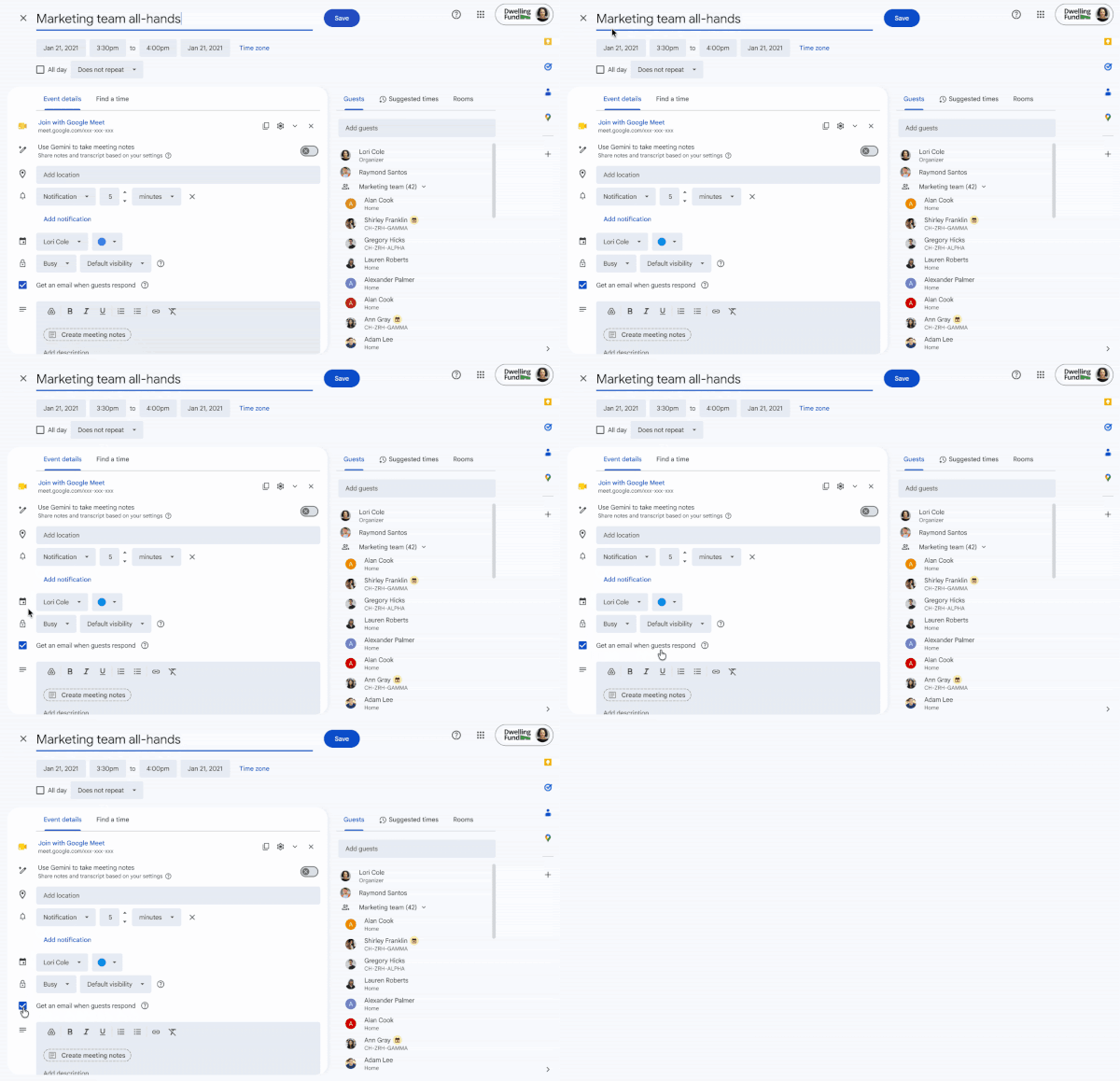
    Google Calendar new setting

    According to Google, the setting will be on by default. You’ll have to click on the box to uncheck it if you want to avoid getting responses. When the box is unchecked, it means the following:

    • Organizers will not receive RSVP emails from attendees using Google Calendar, but their RSVP status will still show up on the Calendar event.
    • Organizers will not receive RSVP emails from attendees using third-party calendar tools (e.g. Outlook), and their RSVP status will not show up on the Calendar event.
    • Organizers will not receive any email auto-replies.

    This feature could be especially helpful for particularly large meetings. Google notes that if you’re setting up a recurring event, this setting can only be applied to the full series.

    The gradual rollout is starting today for rapid release, which could take up to 15 days for visibility. Meanwhile, the rollout will start on September 10 for the scheduled release, with visibility taking 1-3 days. The setting will be available to all Google Workspace customers, Workspace Individual subscribers, and users with personal Google accounts.

    Thank you for being part of our community. Read our Comment Policy before posting.

    annoying Calendars features finally fixing Google meeting
    Elan
    • Website

    Related Posts

    5 times Android Auto says No when your phone says Yes

    September 19, 2026

    Stop Treating CSS Container Queries Like Traditional Media Queries — Smashing Magazine

    September 18, 2026

    Survey reveals where most of you draw the line when it comes to AI

    September 17, 2026
    Leave A Reply Cancel Reply

    Economy News
    Crypto

    Why Trump backed a crypto ethics rule that stopped at the family business

    By ElanSeptember 19, 20260

    Washington came surprisingly close this week to writing a dollar amount into one of its…

    10 Nigerian creators turning social media influence into industry power

    September 19, 2026

    5 times Android Auto says No when your phone says Yes

    September 19, 2026
    Top Trending
    Crypto

    Why Trump backed a crypto ethics rule that stopped at the family business

    By ElanSeptember 19, 20260

    Washington came surprisingly close this week to writing a dollar amount into…

    Tech

    10 Nigerian creators turning social media influence into industry power

    By ElanSeptember 19, 20260

    A decade ago, influencers and creators did not have the kind of…

    Tools

    5 times Android Auto says No when your phone says Yes

    By ElanSeptember 19, 20260

    My phone and Android Auto go together like two peas in a…

    Your source for comprehensive insights on Africa’s private credit markets, InclusiFund synthesizes deal pipelines, repayment patterns, collateral trends, and sector-level signals to guide investors in underwriting and structuring credit in emerging African markets.

    We're social. Connect with us:

    our Categories
    • Work With Us
    • Advertise With Us
    • Contact Us
    • Disclaimer
    • Privacy Policy
    • Terms and Conditions

    Subscribe to Updates

    Get the latest creative news from FooBar about art, design and business.

    Facebook X (Twitter) Instagram Pinterest
    • Work With Us
    • Advertise With Us
    • Contact Us
    • Disclaimer
    • Privacy Policy
    • Terms and Conditions
    © 2025 Inclusifund. All Rights Reserved.

    Type above and press Enter to search. Press Esc to cancel.