

I got into homelabbing because I wanted to host a few game servers for my friends. Over time, I realized that an oversized chunk of my monthly spending was going toward subscriptions, like photo backups, streaming services, and other apps, that I wasn’t using to their maximum potential.
I made a concerted point to cut out as many of those services as I could and start self-hosting free, open-source replacements for many of those services instead. These are some of the best to start with.
Jellyfin
A Plex replacement for your own personal library

Jellyfin is a self-hosted media server that lets you stream your movies, TV shows, and music from a server that sits on your network. In many ways, it is much like Plex, but it doesn’t require a subscription and the lifetime license doesn’t cost $750—it’s completely free.
Once you install Jellyfin, you just point it at your library, organize your files, and install the app on your TV or phone. It makes your server into your own private streaming service.
You can install Jellyfin on anything from a Raspberry Pi to a mini PC to a refurbished gaming PC, but I’d recommend installing it in a Proxmox container running on a server with an Intel processor if you have a choice. It’ll get you the best performance, and some low-power Intel processors (like the N150) are very inexpensive.

- CPU Speed
-
5.1
- CPU
-
AMD Ryzen 7
- Connectivity
-
Bluetooth, Wi-Fi
- Storage
-
32GB
The BOSGAME M4 mini PC has an AMD Ryzen 7 7840HS processor with 32GB of DDR5 RAM. It has a 1TB SSD.
Immich
Photo sync and backup with no privacy risks
Immich is a self-hosted photo and video backup system designed to be a full replacement for Google Photos or iCloud Photos.
The user interface is well-designed and modern, and it includes all of the features you’d expect from a photo app. There are tags, a timeline, and even AI-driven features that allow you to intelligently search your photo backups if you have that feature enabled. It is comprehensive and polished.
I still have Google Photos because I paid for an annual plan, but once my subscription lapses, I’ll be migrating to Immich full-time.
I’d recommend running Immich on a server with a fairly powerful CPU or a GPU. It can run on low-power devices like a Raspberry Pi, but it could be sluggish, and AI features need extra processing power to really shine.
Photos are irreplaceable. Don’t use Immich as your only backup strategy. You need to implement a real 3-2-1 backup plan—multiple copies on different storage types, with at least one copy off-site. Otherwise, you’re just one spilled drink or a drive failure away from losing everything.
Nextcloud
Like OneDrive without Microsoft
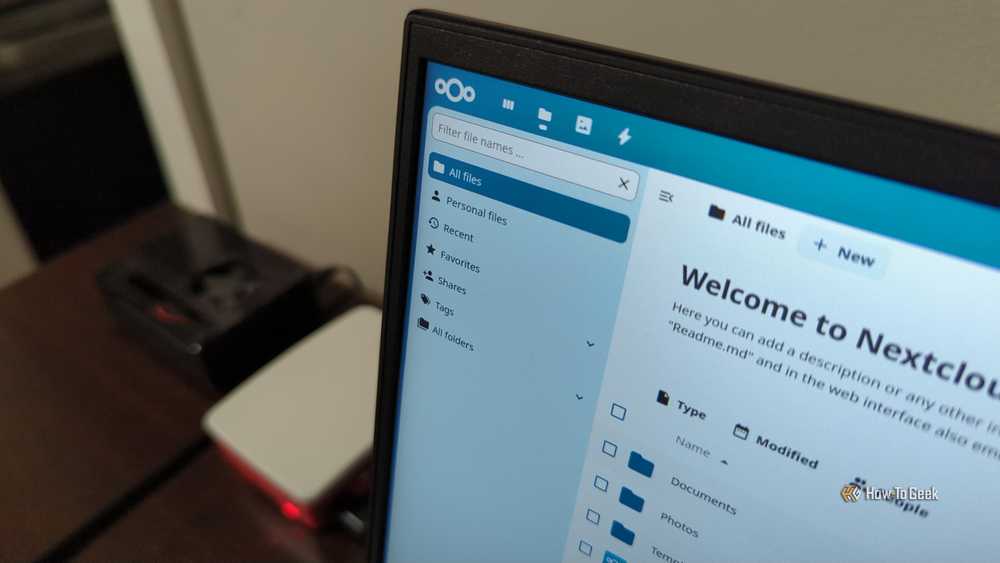
Nextcloud is more like a collection of services that are designed to replace OneDrive, Google Drive, or Dropbox. The most basic use—and the one I use most frequently—is to sync files between your devices, but it can also handle calendars, contacts, and document editing.
In general, the included replacements are very capable, and I don’t usually find myself missing conventional cloud services unless I need to share a file with someone outside my network.
You do need a fairly powerful server to run everything Nextcloud has to offer. It can be very demanding if you try to turn on every single feature at once. Start with file sync and sharing; only add the other bells and whistles when you actually find a need for them to ensure your performance is optimal.

- Storage Capacity
-
8TB
- Cache
-
Up to 256MB
A great CMR hard drive for extra storage or backup.
Joplin
A minimalist note-taking app

Out of every application I self-host, Joplin is the one I use the most—it has become my go-to application for drafting articles, research notes, and personal notes.
It provides notebooks and tags for organization, has Markdown support, and flexible sync options. It can also take plugins if you need extra features.
The Joplin server itself allows all of your devices to synchronize what you’re working on, which turns it into a very effective replacement for most of the paid note-taking applications out there.
The server itself is very lightweight, and you could run it on a Raspberry Pi if you don’t need super snappy syncing.
Navidrome
Your own personal music server

For years, I’ve been building a collection of physical CDs and digitizing them as FLACs to ensure I have easier access. When a new music CD comes out, I’ll pick it up once it goes on sale to add it to my collection
Unfortunately, once you have a huge library of ripped CDs, they often just sit on a hard drive, since they’re not quite as convenient as a service like Spotify, Qobuz, or Apple Music. Navidrome solves that problem by acting as a lightweight server that offers a modern streaming experience for your own music files via a web interface or an app.
I built a portable version that runs on a Raspberry Pi in my car, so I have music without cell service, and pair that with Symfonium on my phone because it has excellent Android Auto support.
Navidrome doesn’t replace Spotify’s massive catalog or its discovery algorithms, but it replaces the need to pay for a subscription just to have your own music collection available everywhere.
Self-hosting is a great way to save on subscription costs in the long-term
Self-hosting isn’t completely free, however. You have to buy the equipment and then pay for electricity once it gets running. However, if you shop around for used PC components and buy hard drives for refurbished bulk storage, you can still get a good deal. If you have an old computer (less than 10 years old) sitting around in a closet somewhere, try using it before you spend anymore—it’ll give you an idea whether you like the hobby or not.
The more services you can replace, the more quickly your homelab will pay for itself. My subscriptions and services cost me around $350 per year when I decided to self-host as much as I could, which means it’ll pay for itself pretty quickly. Your break-even point will depend on the hardware you use and the subscription services you have.
