


Andy Walker / Android Authority
This open-source tool acts as a middleman between elevated Android functionality and permissions and third-party apps, giving the latter (and the user) access to previously locked-away features. It might not sound like much, but it’s a core reason why Shizuku is one of the most important Android apps for power users.
Do you use Shizuku on your Android phone?
283 votes
Despite this power, Shizuku is pretty useless on its own. Without supporting apps that leverage its offerings, it doesn’t really add much to Android. Thankfully, there’s no shortage of apps that rely on it and excel for it.
Below is a list of my favorite Shizuku apps that genuinely enhance my Android experience, from improving app installation to enabling more thorough app uninstallation, to theming tweaks, and so much more.
Canta

Andy Walker / Android Authority
Android really doesn’t like me uninstalling apps, especially those that manufacturers deem essential. For Samsung, this could mean the entire Facebook suite, for instance. Thankfully, with Canta, I can scrub my device of these annoyances with ease.
My leveraging Shizuku, Canta lets me uninstall practically any app on my device, including bloatware and system features. While cherry-picking apps to uninstall can be an adventure, Canta provides guidance about which apps are safe to uninstall and which should probably be left alone.
ColorBlendr

Andy Walker / Android Authority
My apartment might be an eclectic mix of multiple colors and textures, but I prefer my Android phone to have one uniform look and feel. If you’re like me, ColorBlendr is absolutely essential.
Once again, it uses Shizuku to gain access to and hand me more control over Android’s default color picking system. Pick from colors drawn from the wallpaper, a list of standard shades, and even choose which overall color profile you fancy, be it Monotone or Vibrant.
Essentials

Andy Walker / Android Authority
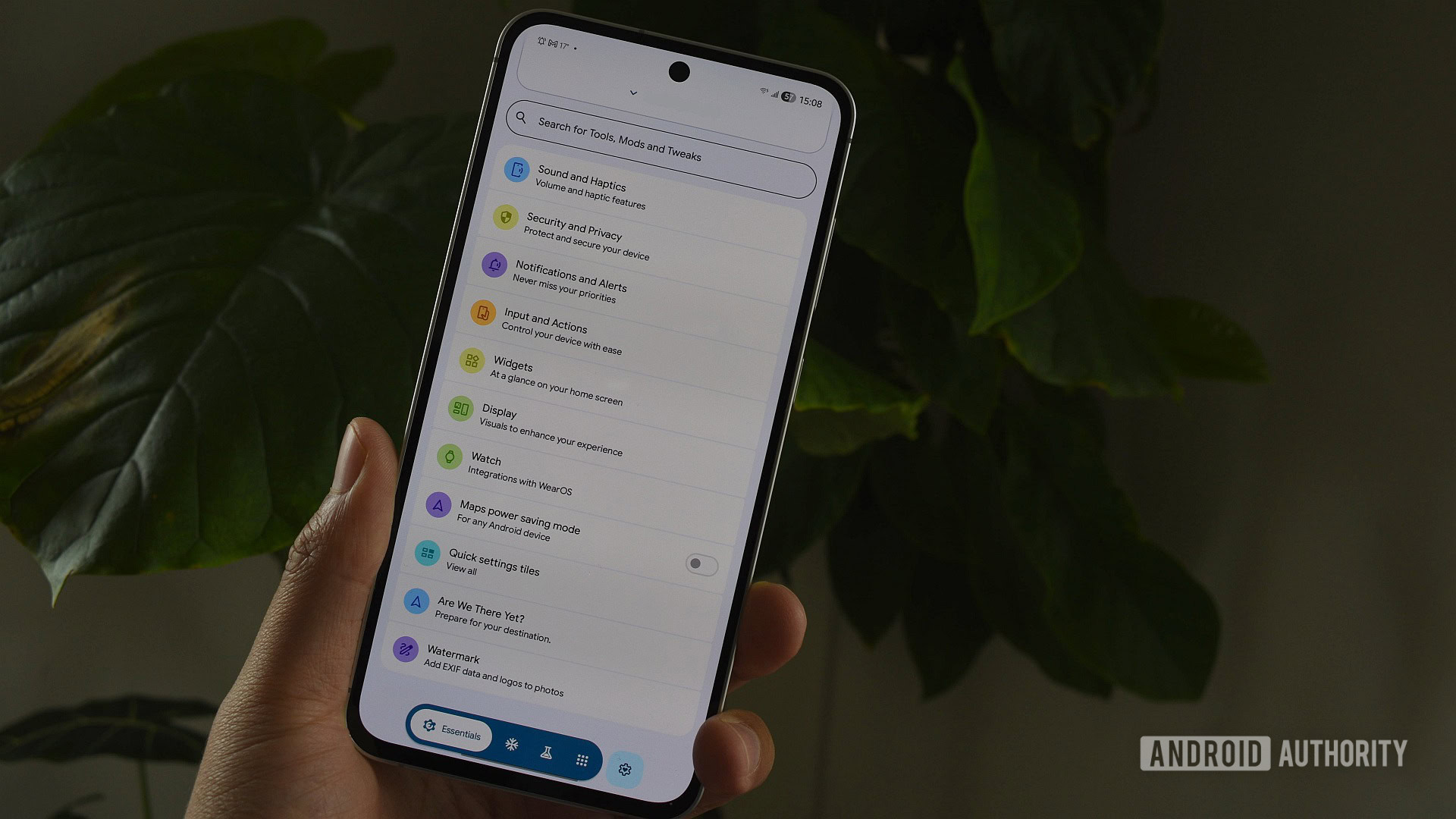
Speaking of Good Lock, Essentials is a collection of features and tweaks for Pixel phones and other Android devices. In a sense, it operates much like Samsung’s toolkit, albeit with less emphasis on UI tweaks.
I can adjust various settings that are usually hidden or inaccessible without Shizuku, including more granular call vibration adjustments, connected device battery alerts, a dedicated widget for switching your screen off, and various status bar customizations.
There are other quirky tools beneath the hood, too, including Are We There Yet? — a real-time distance calculator for a selection of pinned locations — and support for the Pixel 10’s Google Maps battery-saving mode, even on unsupported devices.
Essentials really needs its own deep dive, but in short, it’s a toolkit every Android power user will find handy.
Smartspacer

Andy Walker / Android Authority
There are plenty of Pixel-exclusive features that make other Android phone users rather jealous, and At A Glance is certainly one of them. This widget sits on the Pixel Launcher home screen and displays pertinent, contextual information throughout the day.
Smartspacer extends this feature beyond Pixels and actually makes it even better. It offers a far broader service support list, too, including details from social media, Aftership, Tasker, and more. But, most important of all, it brings At A Glance to Samsung phones and beyond.
ShizuWall

Andy Walker / Android Authority
I only discovered the wonders of ShizuWall recently, but I can’t quite understand how I’ve lived without it.
It’s a firewall that completely bans apps I select from accessing the internet. What I love about ShizuWall is that it doesn’t require a VPN or Private DNS slot — it functions on its own with the help of Shizuku. That’s it.
The app is pretty simple to use and makes for a wonderful defense against trackers and apps that don’t necessarily need to phone home but really want to.
aShell You

Andy Walker / Android Authority
This brilliant little utility lets me run ADB commands on my device, so I can forego plugging it into a PC or using a full-blown terminal app. While I don’t use it regularly, aShell You is one of those apps I’d rather have in my pocket than not.
The app has a list of commands I can run right off the bat, and bookmark support for common commands, so I don’t have to manually type a complicated shell command every time. It also supports saving outputs, making it a useful diagnostic tool.
Dare I say it’s one of the prettiest apps on this list, too, making great use of Google’s Material aesthetic.
Install With Options

Andy Walker / Android Authority
While you normally have to use ADB to install APKs on Android with more advanced instructions, Install With Options simplifies this process. With Shizuku, apps can be installed with various asterisks. You can bypass SDK limits, downgrade apps, force your phone to free up space for them, and tell the system to never kill the installed apps.
It’s an incredible toolkit for installing APKs, just as Google is moving to quash some of the APK install freedoms we’ve come to enjoy.
Again, I don’t use Install With Options often, but I’ve been really glad to have it when downgrading from a buggy app release to a previous stable version.
Adaptive Theme

Andy Walker / Android Authority
I’ve already covered Adaptive Theme in great detail, but it’s well worth reiterating its talents.
Android’s Dark Mode activation is rather restrictive, either requiring manual triggering or occurring on a tight schedule. Adaptive Theme allows my Android phone to switch between Dark and Light modes based on ambient light levels.
How do you use Dark Mode on your phone?
2021 votes
SD Maid SE

Andy Walker / Android Authority
I was a religious SD Maid user back in the early days of Android, but when the old version of the app stopped working on newer OS versions, I said goodbye and left it behind. Recently, I reboarded the SD Maid train with the SE release, and I’m so happy that I did.
As its name suggests, SD Maid SE is a storage-cleanup tool that dusts my phone’s nooks and crannies to find unneeded or unnecessary files ready for deletion. It works incredibly well, and while it is functional without Shizuku, it gains so much reach when paired with it.
Shappky

Andy Walker / Android Authority
Finally, and while we’re on performance-enhancing apps, let’s end with Shappky.
A portmanteau of sorts of Shell App Killer, this little tool lets me kill any running app on my device, even if it’s labeled as a system app. Part of its charm is its simplicity — just tap the apps you want to kill, and hit the switch. You can choose to display system apps or persistent apps, or hide these if you’re less adventurous.
Shappky’s only fault is that it hasn’t been updated for a while, but given its simple premise, I’m not sure how important this detail really is. It still works a charm.
These are my favorite Android apps that support and thrive through Shizuku, but this is by no means a definitive list.
Do you have any apps you’d like to recommend? Which Shizuku apps do you use on a daily basis, and why? Let’s start a conversation in the comments section below.
Don’t want to miss the best from Android Authority?


Thank you for being part of our community. Read our Comment Policy before posting.
